Search This Blog

Thursday, August 22, 2013

Unable to start Rule Studio of WODM aka JRules

I ran into a situation where the rule studio component of JRules 7.1.14 doesn't start anymore. While tumbling around I found out that the Rule Studio.exe just fires up an ant script behind the scenes to start eclipse.
The config of all that desaster lives in \shared\bin. If you have a look at the build.xml in here you'll find a target called runrulestudio. This is the target, which the standard starter fires up. You could even configure your permsize and other config flags here.

As I blamed some misconfiguration of my windows profile or my machine I just wrote a small ant starter to fire the RuleStudio with the environment of my joice like this:


set INSTALLDIR=C:\Program Files (x86)\IBM\WebSphereILOGJRules711
set JAVA_HOME=%INSTALLDIR%\jdk
set ANT_HOME=%INSTALLDIR%\shared\tools\ant
set PATH=%JAVA_HOME%\bin;%ANT_HOME%\bin

c:

cd %INSTALLDIR%\shared\bin

ant runrulestudio -Declipse.location="%INSTALLDIR%\eclipse"


well and that does the trick. Rule Studio starts up again 

Wednesday, July 31, 2013

Windows 7 good to know

Screenshots or snapshots with onboard tool

With Windows 7 you don't need external tools like snagit, gimp, etc. Just use the SnippingTool, which ships with Windows 7!


Send to clipboard as path or name

Well who hasn't used the windows 95 powertoys? One of the need features was "Send to Clipboard as..." which has copied the currently selected file or folder and copied the name or path of it to the clipboard. 
With windows 7 just hold shift key while right clicking the selected files and you will find a new entry within the context menu "Copy as Path". 

Tuesday, July 16, 2013

Pretty print a SOAP Message

Here's a code snip for pretty printing a SOAP message 

import java.io.ByteArrayOutputStream;
import javax.xml.transform.OutputKeys;
import javax.xml.transform.Source;
import javax.xml.transform.Transformer;
import javax.xml.transform.TransformerFactory;
import javax.xml.transform.stream.StreamResult;


    private static final Logger LOG = Logger.getLogger(PrettyPrint.class);
 

    /**
     * Pretty print the XML SOAP message
     *
     * @param source the source payload of a SOAP response or request
     * @return the pretty format of the SOAP message
     */

    private String getPrettyPrintSoapSource(Source source) {
        try {
            TransformerFactory tf = TransformerFactory.newInstance();
            Transformer t = tf.newTransformer();
            t.setOutputProperty(OutputKeys.INDENT, "yes");
            t.setOutputProperty("{http://xml.apache.org/xslt}indent-amount", "2");

            ByteArrayOutputStream bos = new ByteArrayOutputStream();
            StreamResult result = new StreamResult(bos);
            t.transform(source, result);
            return bos.toString();
        } catch (Exception e) {
            LOG.error("Error while pretty printing SOAP source", e);
            return "Error while pretty printing SOAP source";
        }
    }

Wednesday, April 10, 2013

No spaces in Misson Control Mac OSX 10.8.3

I like misson control (aka Exposé) in Mac OSX and the spaces functionality, which allows you to control multiple desktops in Mac OSX. Sincce 10.8.3 I noticed sometimes that the spaces just won't show up anymore in Misson Control. To me it seems to be a problem with the Dock as well. The Dock doesn't display correctly. So open up a terminal and enter

killall Dock

after that your spaces within Mission Control will be back and the Dock will restart.

Thursday, April 4, 2013

How to export a google docs document with comment to pdf

If you export a document with google docs to pdf you will loose all your comments. Heres a way to export the doc with comment

  1. Export google docs document to .odt open office file
  2. Open document in OO
  3. Go to export as PDF and select the "export comments" option
  4. Export to PDF with comment

Wednesday, September 26, 2012

Show Hidden Files in MACOSX

to display hidden Files in Macosx Finder enter the following cmds in your console:

defaults write com.apple.finder "AppleShowAllFiles" -bool "true" && killall Finder

Wednesday, August 29, 2012

Js Modules with Titanium Appcelerator Framework

Here are the two ways you could currently use JS modules within the Titanium Mobile Framework from appcelerator:

1. Function Module

Assume you have a FunctionModule.js with the following content:

// an internal variable, which is only accesible within the module
var internalMsg = "Only visible within the module";

// an exported function, which this module offers
exports.hello = function(msg) {
alert('your message: ' + msg + ' internal message: ' + internalMsg);
}


you could use you module like this:

// reference the module
var fmo = require('/ui/common/FunctionModule');

// call the exported function
fmo.hello('External Message');


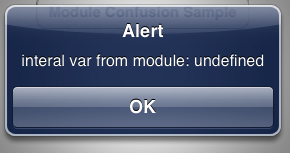
// no access from the outside to the internal variable
alert('interal var from module: ' + fmo.internalMsg)


2. Object Module

Assume you have a ObjectModule.js with the following content:


// constructor of your object
function Sample(name) {
   this.name = name;
}
// function, which alerts the current name
Sample.prototype.showName = function() {
alert('Name: ' + this.name);
}
// function, which sets the name
Sample.prototype.setName = function(name) {
this.name = name;
}
// you just export your Object and override the methods as prototypes
module.exports = Sample;


you could use you module like this:


// reference the module
var SampleModule = require('/ui/common/ObjectModule');
// Create a sample Object
var sam = new SampleModule('Fred');
// call a Method
sam.showName();

// change the internal name
sam.setName('Hugo');
sam.showName();